TL;DR
The best mobile 3D solar design apps for Indian solar contractors in 2026 are built specifically for mobile-first workflows, Indian roof types, and fast on-site proposal generation. This guide ranks the top eight features that matter most — including shading analysis, regional roof support, proposal speed, CRM integration, and 3D visualization — based on their impact on sales conversions and field efficiency. The right app helps solar teams create accurate, branded proposals directly from the rooftop, close deals faster, and scale operations without workflow bottlenecks.
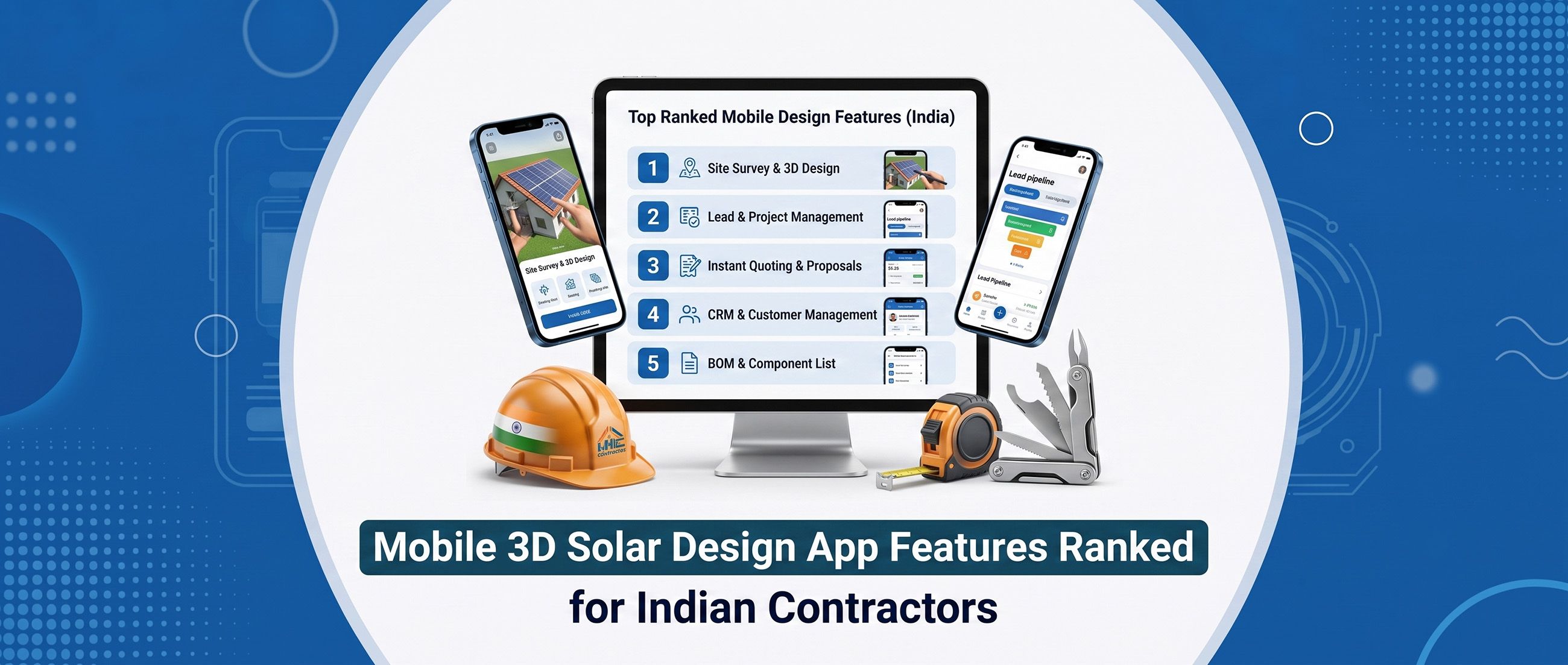
Picture this: your sales rep finishes a rooftop survey in Pune at 4 PM. The customer is standing right there, curious and warm. Instead of saying "I'll send you a proposal by tomorrow," your rep pulls out a phone, runs a 3D shading analysis, and hands the customer a branded proposal PDF before stepping off the roof. Deal closed. That is the real-world power of the right mobile 3D solar design app — and it is exactly what separates fast-growing Indian solar contractors from the ones still emailing Excel sheets the next morning. But not all mobile design apps are built equal. Some are desktop tools awkwardly squeezed onto a small screen. Others lack the India-specific features that matter on the ground — flat RCC terraces, Mangalore tile roofs, urban shading from water tanks and neighboring buildings. Choosing the wrong app does not just slow you down; it costs you deals. This guide ranks the eight most important features of a mobile 3D solar design app for Indian solar contractors in 2026. Each feature is scored on two dimensions: its impact on sales conversion and its impact on site survey efficiency. Whether you are evaluating your first app or upgrading from a tool that no longer fits your team, this list tells you exactly where to focus. Why Indian Solar Contractors Need a Mobile-First Design Toolkit in 2026 India's solar market is moving fast. According to the Ministry of New and Renewable Energy (MNRE), India has set ambitious rooftop solar targets that are driving a surge in residential and commercial installations across Tier 1 and Tier 2 cities alike. That growth means more site visits, more proposals, and more competition for every customer's signature. The contractors winning in this environment share one trait: they close deals on-site. They do not wait 24 hours to send a proposal. They do not rely on a desktop engineer back at the office to run shading numbers. They use a mobile 3D solar design app that puts the full design-to-proposal workflow in their pocket. Indian solar contractors also face challenges that their counterparts in the US or Europe simply do not. Roof diversity is extreme — from flat concrete terraces in Mumbai to sloped Mangalore tile roofs in Kerala to corrugated metal sheets in industrial zones. Shading obstacles are uniquely Indian: overhead water tanks, staircase covers, temple spires, and densely packed neighboring buildings. A generic Western-designed app will miss these realities entirely. That is why feature prioritization matters. The goal of this listicle is to help you cut through the noise and invest in the capabilities that will actually move the needle for your business. How We Ranked These Mobile 3D Solar Design App Features Each feature below is evaluated on two axes: Sales Conversion Impact (SCI): How directly does this feature help your team close more deals, faster? Site Survey Efficiency (SSE): How much does this feature reduce time, errors, and friction during a field visit? Both scores run from 1 (low impact) to 5 (critical). Features are ranked by their combined score, with ties broken by India-specific relevance. Solarladder's mobile 3D solar design platform was used as a reference benchmark throughout, given its purpose-built design for Indian solar contractors. 1. Mobile-First Interface, The Foundation of Everything Sales Conversion Impact: 5/5 | Site Survey Efficiency: 5/5 A mobile-first interface is not a nice-to-have. It is the prerequisite for everything else on this list. If your app was designed for a desktop and then adapted for mobile, your sales reps will feel it immediately, clunky menus, tiny tap targets, slow load times on a 4G connection, and a UI that requires pinching and zooming just to select a roof edge. A genuinely mobile-first solar design app is built from the ground up for touch screens. Controls are large and intuitive. The workflow is linear and guided, not a maze of nested menus. It loads quickly even on mid-range Android devices, which are the most common smartphones in the hands of Indian field teams. Offline mode is equally critical. Many Indian rooftop sites, industrial estates, rural areas, basement-level offices, have poor connectivity. An app that freezes or loses data without a signal is a liability, not an asset. Look for apps that cache project data locally and sync when connectivity is restored. What to look for: Touch-optimized controls with no desktop UI artifacts Offline functionality with automatic sync Fast performance on mid-range Android devices Guided, step-by-step design workflow Minimal learning curve for non-technical sales reps 2. Regional Roof Type Support, India-Specific and Non-Negotiable Sales Conversion Impact: 4/5 | Site Survey Efficiency: 5/5 India's roofing landscape is one of the most diverse in the world. A mobile 3D solar design app that only supports gable roofs and hip roofs, the standard configurations in North American and European markets, will leave your design team improvising workarounds for the majority of Indian installations. Consider what your team actually encounters in the field: Flat RCC terraces, the dominant roof type in urban India, requiring specific tilt-mounting configurations Mangalore clay tile roofs, common across South India, with unique structural load considerations Corrugated metal sheet roofs, widespread in industrial and semi-urban zones Asbestos cement sheet roofs, still present in older industrial buildings Mixed terraces with parapets, requiring precise edge setback modeling When your app supports these configurations natively, your design accuracy improves dramatically. Yield estimates become more reliable. Panel layout recommendations are actually buildable. And your customer gets a proposal that reflects their actual roof, not a generic approximation. What to look for: Pre-built templates for Indian roof types Adjustable tilt, pitch, and azimuth settings Parapet and edge setback modeling Support for mixed roof configurations on a single site 3. Shading Analysis Accuracy, Where Deals Are Won or Lost Sales Conversion Impact: 5/5 | Site Survey Efficiency: 4/5 Shading analysis is the feature that separates a credible solar design tool from a glorified drawing app. In Indian urban environments, shading obstacles are everywhere: overhead water tanks, staircase covers, AC units, neighboring buildings, and even temple structures. A shading error of just 10-15% in your yield estimate can turn a profitable installation into a customer complaint six months later. There is a meaningful difference between basic shadow overlays, which simply draw a shadow shape on the roof, and true 3D shading simulation, which calculates the actual energy impact of each obstacle across every hour of every day of the year. The latter is what your customers deserve, and what your proposals need to be defensible. High-quality shading analysis also builds trust during the sales conversation. When you can show a customer exactly how the water tank on their roof affects their system output, and how your panel layout minimizes that impact, you are demonstrating expertise that competitors without this tool simply cannot match. According to NREL's solar research, shading can reduce solar panel output by 10, 25% depending on system configuration. Accurate shading analysis is not just a sales tool, it is a technical obligation. What to look for: True 3D shading simulation (not just 2D shadow overlays) Seasonal and hourly shading calculations TSRF (Total Solar Resource Fraction) and TOF (Tilt and Orientation Factor) metrics Ability to model custom obstacles (tanks, covers, neighboring structures) Shading impact displayed in kWh/year terms customers can understand 4. Proposal Export Speed, From Site Survey to Signed Deal in Minutes Sales Conversion Impact: 5/5 | Site Survey Efficiency: 4/5 Speed is a conversion multiplier. Every hour that passes between a site visit and a proposal in the customer's inbox is an hour for doubt to creep in, for a competitor to call, or for the customer's enthusiasm to cool. The best mobile 3D solar design apps eliminate that gap entirely by generating a proposal the moment the design is complete, right there on the rooftop. This is not just about convenience. It is about competitive positioning. When your sales rep can hand a customer a professional, data-rich proposal before leaving their premises, you signal that your company is organized, capable, and serious. That impression is worth more than any discount. The key is tight integration between the 3D design output and the proposal template. The app should auto-populate system specifications, panel count, total capacity, estimated annual generation, financial projections, directly from the design. No manual data entry. No copy-paste errors. No waiting for a back-office team to "build the proposal." What to look for: One-click proposal generation from completed design Auto-populated system specs (kWp, panel count, inverter details) PDF export optimized for mobile sharing (WhatsApp, email) Sub-60-second generation time No dependency on desktop software or back-office staff 5. Customised Proposal Output, Winning Trust With Branded Professionalism Sales Conversion Impact: 5/5 | Site Survey Efficiency: 3/5 A proposal is not just a document. It is a brand statement. When a customer receives a proposal with your company logo, their name, photos of their actual roof, and a clear financial breakdown tailored to their electricity bill, they feel seen. That emotional connection is a powerful conversion driver, especially in the residential segment where trust is the primary purchase criterion. Generic proposals, white-label PDFs with no branding, no personalization, and no financial context, communicate the opposite. They say: "We process hundreds of customers and you are just another one." That is not the message a growing solar contractor wants to send. Customization also extends to financial modeling. Indian customers want to see payback period, annual savings in rupees, and ROI projections that reflect their actual electricity tariff and consumption. An app that lets you input local DISCOM rates and generate a localized financial summary is far more persuasive than one that shows generic numbers. What to look for: Company logo and branding on all proposal pages Customer name and site-specific photos embedded in the proposal Editable financial projections with local tariff inputs ROI, payback period, and annual savings in INR Multiple proposal templates for residential vs. commercial clients 6. 3D Visualization Quality, Helping Customers Say Yes Faster Sales Conversion Impact: 4/5 | Site Survey Efficiency: 3/5 Humans are visual decision-makers. When a customer can see a photorealistic 3D rendering of solar panels on their own roof, from multiple angles, in realistic lighting, the abstract concept of "going solar" becomes concrete and exciting. That visual moment is often the tipping point in a sales conversation. The difference between a flat 2D layout and a true 360-degree 3D preview is significant. A 2D layout shows where panels will go. A 3D preview shows what the installation will look like, and that distinction matters enormously to homeowners and commercial property owners who care about aesthetics. Shareable design links add another dimension. When your customer can share a 3D preview of their future solar installation with their spouse, business partner, or building committee, you are turning your design tool into a word-of-mouth engine. The design does the selling for you. What to look for: 360-degree 3D preview with realistic panel rendering Multiple viewing angles and zoom capability Shareable design links for customer sharing Realistic lighting and shadow representation Fast rendering on mobile hardware 7. CRM and Workflow Integration, Closing the Loop From Design to Deal Sales Conversion Impact: 4/5 | Site Survey Efficiency: 4/5 A mobile 3D solar design app that operates as a standalone tool creates a data silo. Your design lives in one app, your customer information lives in a spreadsheet, your follow-up tasks live in WhatsApp, and your invoices live in Tally. This fragmentation is the single biggest operational drag on growing Indian solar businesses. The most valuable design apps are those that connect natively to a broader solar CRM software and project management platform. When a design is completed, it should automatically update the customer's record in the CRM, trigger a follow-up task for the sales rep, and feed system specifications into the project management workflow. No manual handoffs. No data re-entry. This integration also enables better business intelligence. When your design data flows into your CRM, you can track conversion rates by design type, identify which proposal formats close fastest, and measure how shading analysis affects deal outcomes. That is the kind of insight that helps you build a smarter sales process over time. Solarladder's platform is built around this integration philosophy. The mobile 3D design app connects directly to the CRM, proposal engine, project management module, and solar invoicing workflow, so every design you create on a rooftop automatically advances the deal in your pipeline. See how the design-to-deal workflow works. What to look for: Native sync with solar CRM software (not just CSV export) Automatic task creation on design completion Design specs feeding directly into project management stages Connection to invoicing and financial workflows Unified customer record across design, CRM, and project tools 8. Site Survey Digital Forms, Replacing Paper Before the Design Starts Sales Conversion Impact: 3/5 | Site Survey Efficiency: 5/5 The design is only as good as the data that feeds it. If your sales rep is scribbling roof measurements on a notepad and then transcribing them into the design app back at the office, you are introducing errors at every step. Digital site survey forms eliminate this problem by capturing structured data, measurements, photos, electrical details, customer preferences, directly in the app, in the field. The best implementations use plug-and-play form templates that guide the sales rep through every data point needed for an accurate design. GPS tagging ensures the site location is recorded precisely. Photo capture lets the rep document shading obstacles, roof conditions, and electrical panel locations without a separate camera app. When site survey data flows directly into the 3D design workflow, the time from "survey complete" to "design ready" collapses from hours to minutes. That speed advantage compounds across every site visit your team does in a week. What to look for: Pre-built site survey form templates for residential and commercial sites In-app photo capture with annotation capability GPS location tagging Direct data flow from survey form to 3D design inputs Offline form completion with sync on reconnection Feature Priority Matrix: What Matters Most at Each Stage Not every feature deserves equal attention at every stage of your business. Here is a quick-reference guide to help you prioritize based on where your team is today: Feature Sales Conversion Impact Site Survey Efficiency Priority For Mobile-First Interface ⭐⭐⭐⭐⭐ ⭐⭐⭐⭐⭐ All teams Regional Roof Type Support ⭐⭐⭐⭐ ⭐⭐⭐⭐⭐ All Indian contractors Shading Analysis Accuracy ⭐⭐⭐⭐⭐ ⭐⭐⭐⭐ Urban & semi-urban teams Proposal Export Speed ⭐⭐⭐⭐⭐ ⭐⭐⭐⭐ Sales-focused teams Customised Proposal Output ⭐⭐⭐⭐⭐ ⭐⭐⭐ Residential & commercial teams 3D Visualization Quality ⭐⭐⭐⭐ ⭐⭐⭐ Residential sales teams CRM & Workflow Integration ⭐⭐⭐⭐ ⭐⭐⭐⭐ Growing EPCs & multi-rep teams Site Survey Digital Forms ⭐⭐⭐ ⭐⭐⭐⭐⭐ High-volume field teams If you are a small team of 2-5 sales reps just getting started with a mobile 3D solar design app, focus first on features 1 through 5. A mobile-first interface, regional roof support, accurate shading, fast proposals, and branded customization will give you the biggest immediate lift in conversion rates. If you are a growing EPC with 10+ field reps and multiple ongoing projects, features 7 and 8 become equally critical. CRM integration and digital site surveys are what prevent your operations from breaking down as volume increases. This is where solar EPC tools India teams need to think beyond the design app itself and evaluate the full platform ecosystem. The bottom line: The best mobile 3D solar design app for Indian contractors is not the one with the most features, it is the one where every feature is built for the way Indian solar teams actually work, on Indian roofs, with Indian customers.
Frequently Asked Questions
Yes, the best apps offer offline mode that lets you complete designs and fill survey forms without an active internet connection. Data syncs automatically when you reconnect. This is especially important for industrial sites, rural locations, and basement-level electrical rooms where connectivity is unreliable. Always confirm offline capability before committing to any mobile 3D solar design app.
Modern mobile shading analysis tools have closed the gap significantly with desktop counterparts. Apps that use true 3D simulation engines, rather than simplified 2D overlays, can deliver accuracy within 3-5% of professional desktop tools like Aurora Solar (https://www.aurorasolar.com/). For most residential and small commercial installations, that level of accuracy is more than sufficient for a credible proposal. For large commercial or industrial projects, a desktop verification step is still recommended.
Absolutely. Generic apps designed for Western markets typically support gable, hip, and shed roof configurations, which cover perhaps 20-30% of Indian rooftops. The majority of Indian installations are on flat RCC terraces, Mangalore tile roofs, or metal sheet structures. Without native support for these configurations, your designs will be inaccurate, your yield estimates will be unreliable, and your proposals will lose credibility with technically informed customers.
With a well-integrated mobile 3D solar design app, proposal generation should take under 60 seconds after the design is complete. Solarladder's platform, for example, is built to generate a branded proposal in under one minute directly from the completed 3D design, with system specs, financial projections, and company branding auto-populated. The goal is to have a shareable PDF ready before you leave the customer's premises.
A standalone app is a good starting point, but it creates data silos as your business grows. When your design tool does not talk to your CRM, project management system, or invoicing workflow, you end up re-entering data manually and losing visibility across your pipeline. For teams handling more than 10-15 projects per month, an integrated platform that combines the mobile 3D solar design app with solar CRM software, project management, and solar invoicing delivers far greater ROI than a collection of disconnected tools.